• Skip to main navigation
  • Skip to main content
  • Skip to footer
  • Skip to sidebar
Bridging apps alt

BridgingApps

Social Links

  • Facebook
  • Instagram
  • LinkedIn
  • Pinterest
  • Twitter
  • YouTube

Search the Site

Register/Sign up

Sign In | Help

  • Home
  • About
    • Our Mission
    • Success Stories
    • Meet the BridgingApps Team
    • Meet the Reviewers
    • News
    • Contact Us
  • Getting Started
    • Welcome
    • Making Life Accessible
    • How-To Videos
    • Register
  • App Search
    • Find an App
    • App Lists
    • How to Search for Apps
    • Financial Tech
    • Our Review System
    • Add an App For Review
  • Services
    • Assistive Technology Lab Services
    • Family Transition Tool- TexasYouth2Adult (TY2A)
    • Training
    • Courses
    • BridgingApps AT Podcast
    • Newsletter
  • Communities
    • Educators
    • Seniors
    • Veterans
    • Caregivers
    • Families
    • Consumer Directed Services Resource
    • Get Involved
    • Become a Reviewer
  • Blog
  • Donate
  • Help
  • Skip to menu toggle button

Author: Katherine Swarts

Digital Content Writer at BridgingApps since May 2022.
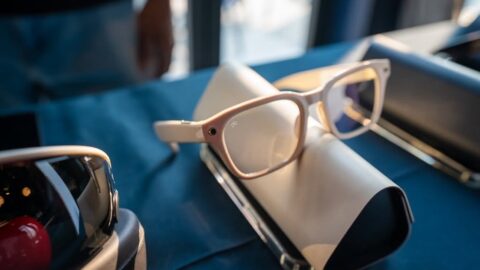
2 pairs of AI glasses sitting on display counter

Smart Glasses for Low Vision

Categorized in: Assistive Technology, Hardware Posted on: January 29, 2026 Last updated on: January 29, 2026 Written by: Katherine Swarts Comments: 0
Follow-up to last September’s article “What Are Meta AI Glasses?” Created for hands-free digital access, Meta glasses have become common assistive technology (AT) for users with vision impairments. They can describe a user’s surroundings, send text messages, access the internet,…
Continue reading…
“Cloned screens” setup in Tara’s home.

What Is a Screen Extender?

Categorized in: Hardware Posted on: January 21, 2026 Last updated on: January 21, 2026 Written by: Katherine Swarts Comments: 0
Screen extender: a portable monitor that attaches to a laptop or other digital device, adding one or more displays to the setup. May fasten directly to the device’s built-in screen, or stand separately with a cable or wireless connection. Alternate…
Continue reading…
students and teacher gathered around a laptop at table

List Highlight: BridgingApps Planning and Goal-setting Apps

Categorized in: App Lists Posted on: January 20, 2026 Last updated on: January 20, 2026 Written by: Katherine Swarts Comments: 0
January being the month of new beginnings, BridgingApps invites you to check out our recently updated list of Planning and Goal-setting Apps. A few highlights:
Continue reading…

New Assistive-Technology Resource: Access Navigator

Categorized in: Assistive Technology Posted on: January 14, 2026 Last updated on: January 14, 2026 Written by: Katherine Swarts Comments: 0
There are more assistive-technology (AT) options than ever before. There are also more areas of potential confusion. And, unfortunately, there are still teachers/therapists/healthcare providers who take a “one size fits all” attitude. If a technology works for one client, they…
Continue reading…

The Art of Turning Dreams into Strategies

Categorized in: Autism, Feature, Tips & Tricks Posted on: January 13, 2026 Last updated on: January 13, 2026 Written by: Katherine Swarts Comments: 0
Happy January! Did you make any New Year’s resolutions this year—or are you cynical about resolutions to begin with? Achieving any goal requires more than a dream: it requires sound judgment, planning, perseverance, and motivation. A challenging list for most…
Continue reading…
woman blowing nose

BridgingApps List Highlight: Virus Prevention and Care

Categorized in: App Lists Posted on: January 12, 2026 Last updated on: January 12, 2026 Written by: Katherine Swarts Comments: 0
Flu. COVID. RSV. The common cold. Chances are you know someone who has had one of these recently—or that you’ve been smacked by a virus yourself this season. You know the basic rules of preventing viruses and/or encouraging quick recovery:…
Continue reading…

“I Can’t Stop Thinking!” Or, Autism Is a Workaholic Brain

Categorized in: Autism Posted on: January 7, 2026 Last updated on: January 7, 2026 Written by: Katherine Swarts Comments: 0
If I don’t obsess about something then it doesn’t get done. Unfortunately, I’m not always able to pick my obsessions. –David Finch, author of personal-experience book The Journal of Best Practices I Do It My Way Obsessions are a common…
Continue reading…

Raising Independent Kids in a Protective Society

Categorized in: Feature, Special Needs Family Posted on: January 5, 2026 Last updated on: January 5, 2026 Written by: Katherine Swarts Comments: 0
My kids packed their own lunches starting in preschool. One day, my daughter’s teacher called in a panic: “Kate’s ‘lunch’ is nothing but strawberries!” She expected me to rush over with extra food, and was seriously surprised when I said…
Continue reading…
2 people sitting at table looking at laptop and phone

List Highlight: BridgingApps New and Updated Apps

Categorized in: App Lists, Feature Posted on: December 27, 2025 Last updated on: December 22, 2025 Written by: Katherine Swarts Comments: 0
To celebrate the transition from 2025 to 2026, we highlight our BridgingApps New and Updated Apps list (call it a “Top 40” list if you like). A few high-rated apps that could help with New Years’ resolutions and other life…
Continue reading…
4 adults wearing santa hats sitting in a office

Holiday Cyberhumor

Categorized in: Feature Posted on: December 23, 2025 Last updated on: December 22, 2025 Written by: Katherine Swarts Comments: 0
’Tis the season to be jolly. We wish you a lighthearted holiday, and this collection of “cyberhumor” is our gift to you.  Carols for the Digital Age Riddles Groaners Holiday Apps That Bring Chuckles Lots of apps offer humorous videos,…
Continue reading…
Page: 1 Page: 2 Page: 3 … Page: 44 Next page »

Recent Posts

  • Smart Glasses for Low Vision January 29, 2026
  • BridgingApps Reviewed App | one sec | screen time + focus January 26, 2026
  • What Is a Screen Extender? January 21, 2026
  • List Highlight: BridgingApps Planning and Goal-setting Apps January 20, 2026
  • New Assistive-Technology Resource: Access Navigator January 14, 2026

Address

4888 Loop Central Drive, Suite 200 | Houston, Texas 77081
Office (713)-838-9050 x 383 | Fax (713)-838-9098

Bridging apps alt

BridgingApps

About

  • Our Mission
  • Success Stories
  • Meet the BridgingApps Team
  • Meet the Reviewers
  • News
  • Contact Us

Getting Started

  • Welcome
  • Making Life Accessible
  • How-To Videos
  • Register

App Search

  • Find An App
  • App Lists
  • How to Search For Apps
  • Financial Tech
  • Our Review System
  • Add an App For Review

Services

  • Assistive Technology Lab Services
  • Family Transition Tool- TexasYouth2Adult (TY2A)
  • Training
  • Courses
  • BridgingApps AT Podcast
  • Newsletter

Communities

  • Educators
  • Seniors
  • Veterans
  • Caregivers
  • Families
  • Get Involved
  • Become a Reviewer
© 2025 BridgingApps | Privacy Policy | Site Disclaimer | Accessibility
  • Facebook
  • Instagram
  • LinkedIn
  • Pinterest
  • Twitter
  • YouTube